Stop Guest Emails: 8 Wedding Website Content Essentials

Stop Guest Emails: 8 Wedding Website Content Essentials
Every wedding website needs eight things: the date, venue names with full addresses, an RSVP form with a deadline, ceremony and reception times, a dress code, travel and accommodation notes, a registry link, and an FAQ. Miss any of these and guests start emailing you instead of reading your site. A website is especially worth building for destination or multi-day weddings; for a small backyard ceremony with 20 close relatives, a group text might cover it. If you’re worried about strangers finding your address, password-protect the sensitive pages.
TL;DR:
- A wedding website should prominently feature the date, venue addresses, RSVP deadline, and a clear schedule to minimize guest questions.
- Including detailed travel, lodging, and a straightforward FAQ significantly reduces last-minute inquiries and clarifications.
- Use simple, adaptable wording for key pages, avoiding overcomplicated bios or lengthy relationship stories, and match the tone to the event style.
- Launch the website early, at least with minimal info during save-the-dates, then update it with full details closer to the wedding.
- Consider an integrated planning platform for real-time updates, guest list management, and streamlined coordination, especially for multi-day or destination weddings.
Table of Contents
- What Should Go on a Wedding Website? The Essentials Checklist
- What Should I Write? Wording Examples for Key Pages
- Do You Need Extra Pages, or Will They Just Clutter the Site?
- When Should You Launch Your Wedding Website?
- How Should the Site Be Organized for Guests?
- How Can an Event Planning Platform Simplify Your Wedding Website?
- What Goes in the Welcome Message From the Couple?
- How Much of Your Engagement Story Should You Share?
- What Should You Say About Your Wedding Party?
- Who Should Guests Contact With Questions?
- How Do You Handle Virtual Attendance or Livestreaming?
- Quick Wins for Wedding Website Content
- How Jubiliq Keeps Your Wedding Website and Guest List in Sync
- Sources
- FAQ
What Should Go on a Wedding Website? The Essentials Checklist
Wedding website content works best when you think about it from your guests’ side of the screen, not yours. Someone lands on your homepage looking for one thing: when and where, and how do I say yes. A minimalist hierarchy that answers those questions in under ten seconds beats a beautifully designed site that buries logistics under love-story paragraphs.
Here’s the priority order, based on what guests actually search for first:
- Home/welcome page: your names, the date, and the city, visible without scrolling. Save the sentimental stuff for a dedicated “Our Story” page.
- Date and times: write it out fully. “Saturday, June 13, ceremony at 4:00 PM” beats “6/13” every time, since numeric dates get misread across regions.
- Venue details: full street address for every location, a clickable map link, and a line about parking (free lot, valet, street parking only).
- RSVP form: name fields, a yes/no toggle, meal selection if relevant, a plus-one field only if that guest actually has one, and a deadline stated in bold.
- Schedule or itinerary: for anything beyond a single ceremony and reception, list start times for the welcome party, ceremony, cocktail hour, reception, and next-day brunch if there is one.
- Dress code: name it specifically. “Cocktail attire” or “black tie optional” tells guests what to pack; “dress nice” tells them nothing.
- Travel and accommodation: nearest airport, whether you’ve arranged a shuttle, and a hotel block with the group name or booking code.
- Registry and gifts: a simple link, placed low on the page, never on the invitation itself.
- FAQ: the eight or ten questions you’d otherwise answer one text at a time.
That last item does more heavy lifting than any other page on the site. A tight, well-built FAQ is often the single highest-value page because it intercepts the questions people would otherwise send you directly, usually at 11 p.m., usually about parking.
Fill each of these sections out before you touch fonts or color palettes. A gorgeous site with a missing RSVP deadline creates more work than a plain one that has every fact locked down.
What Should I Write? Wording Examples for Key Pages
Staring at a blank welcome message is its own kind of wedding stress. Ready-to-adapt copy tends to work better than generic advice because you can just swap in your names and move on. Here are starting points for the pages people get stuck on most.
Welcome message, three tones:
- Formal: “We are delighted to invite you to celebrate our marriage on June 13, 2026, in Charleston, South Carolina.”
- Warm: “We can’t wait to celebrate with the people who mean the most to us. Thank you for being part of our story.”
- Playful: “We’re getting married! Come dance, eat cake, and watch us pretend we know how to slow dance.”
RSVP prompt with a deadline: “Please RSVP by the stated deadline. Click below, answer a few quick questions, and you’re set. We’ll confirm your spot by email promptly.”
Registry phrasing, three approaches:
- Standard: “We’re registered at [store]. Thank you for thinking of us!”
- Honeymoon fund: “Our greatest gift would be help getting to Portugal. Contribute to our honeymoon fund below.”
- No gifts: “Your presence is the only gift we need. If you’d like to do something special, a donation to [charity] would mean the world.”
Sensitive policies, polite but firm:
- Adults-only: “As much as we love your kids, our celebration is an adults-only affair. We hope this gives you a night off to enjoy!”
- Unplugged ceremony: “We invite you to be fully present. Please keep phones and cameras away during the ceremony. Our photographer has it covered.”
- Plus-one clarity: “Your invitation will note if a plus-one is included. If you have questions, reach out to [name].”
One-line clarifications:
- “Cocktail attire: think dressy, not black tie. No jeans, please.”
- “Parking is free at the venue lot; overflow parking is across the street at [location].”
Copy these, adjust the tone to match your relationship, and move on. Wording is not the place to overthink.
Do You Need Extra Pages, or Will They Just Clutter the Site?
Some additions genuinely help guests. Others just add scrolling. A photo gallery or a curated Things to Do page earns its spot for destination weddings, where out-of-town guests need restaurant and activity ideas for the days around the ceremony. A printable day sheet helps your wedding party and family know exactly where to be and when. A playlist embed is a nice touch but purely optional.
For a local, single-day wedding, skip most of the extras. Guests already know the area, they’re not staying overnight, and a shorter site means fewer things that can go stale or get skipped over.
Privacy deserves a specific decision, not an afterthought. Password-protect the exact ceremony address and start time if you’re worried about uninvited guests, and consider gating the full itinerary behind a login for the same reason. A password-protected page for sensitive details is standard practice for weddings with a public-facing online presence, like couples with larger social followings.
Leave off: a full relationship timeline nobody but you cares about, autoplay music (guests browsing at work will close the tab immediately), overlong bridal party bios, and countdown timers that just remind everyone how close the deadline is.
Pro Tip: If you’re debating whether to add a page, ask “would a guest text me this question if it weren’t on the site?” If yes, add it. If no, skip it.
When Should You Launch Your Wedding Website?
Timing matters more than most couples expect. A partially finished site published early beats a perfect one published late.
- At save-the-dates: publish a minimal version with just the date, city, and a note that “more details are coming soon.” Getting a bare-bones site live early matters more than waiting for a finished design.
- Three months out: add the full schedule, venue addresses, dress code, and the RSVP form with its deadline.
- Two weeks out: lock the final itinerary, confirm hotel block codes, and post any last-minute changes (weather plans, parking updates).
- After the wedding: remove password protection if you used it, and either archive the site or leave a short thank-you note up in place of the RSVP form.
Pick one person, usually one half of the couple, as the point contact for edits. Two people editing the same site without talking creates outdated pages fast.
How Should the Site Be Organized for Guests?
Good wedding website content is only half the job. How it’s arranged determines whether guests actually find it.
Keep your top navigation to five items or fewer: Home, Schedule, Travel, Registry, and FAQ. Push anything else, like a photo gallery or Things to Do page, into a dropdown or a link at the bottom of the FAQ.
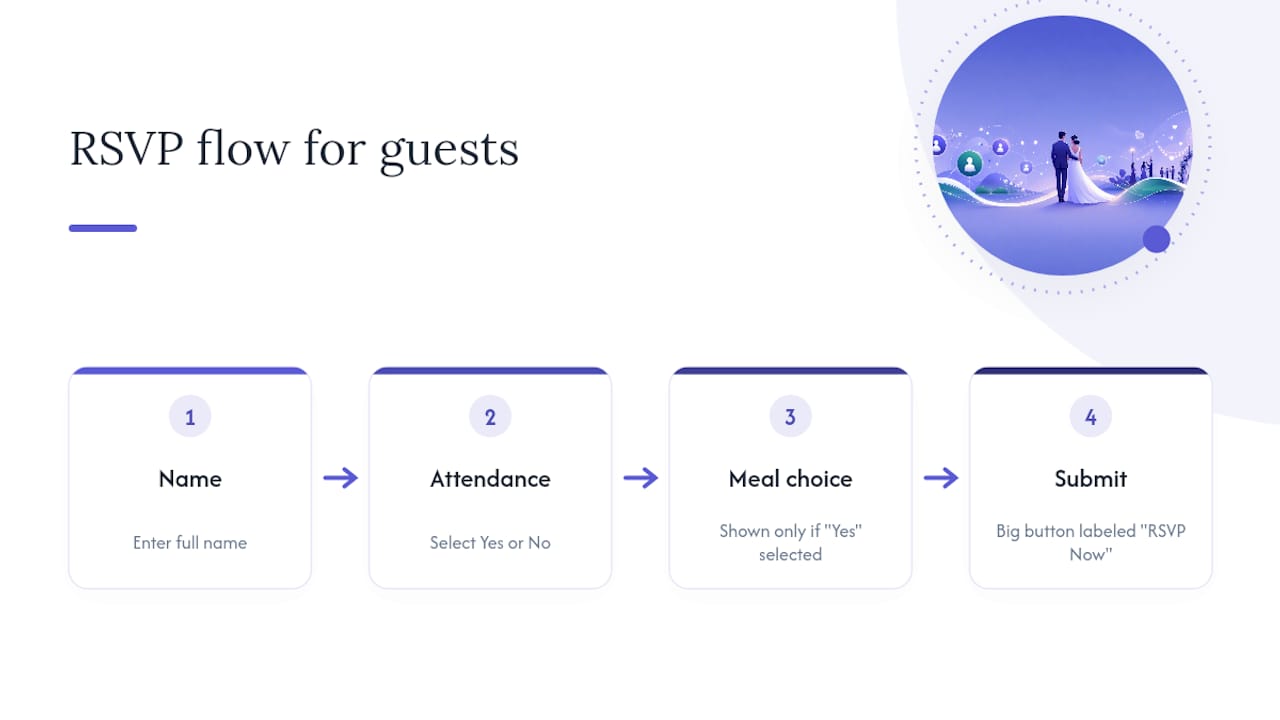
Your RSVP form is the one page that has to work flawlessly. Ask only for what you need: name, attendance, and meal choice if catering requires it. Reveal meal options only after someone selects “yes,” so a “no” response doesn’t force them through irrelevant fields. Clear call-to-action buttons on the RSVP form measurably improve completion, so make that button big, obvious, and labeled “RSVP Now,” not something vague like “Continue.”
Before you share the link, test everything on a phone: tap targets on the RSVP buttons, whether the map link opens Apple Maps or Google Maps correctly, and whether your font is legible at default zoom. Add alt text to photos, keep contrast high enough to read outdoors, and make sure the whole form works with a keyboard alone. A family-focused RSVP checklist is a useful reference if you’re building the form from scratch and want to avoid missing a field guests will actually need.
Pro Tip: Send the link to two people, one tech-savvy and one who barely texts, before your official send. If both can RSVP without asking you a question, you’re ready to launch.
How Can an Event Planning Platform Simplify Your Wedding Website?
Building all this content by hand in a page builder works, but it means juggling a spreadsheet for guest names, a separate form for RSVPs, and a third tool for the day-of schedule. An integrated platform folds those into one place.
- Centralized RSVPs: responses flow straight into your guest list, so you’re not copying names from a form into a spreadsheet by hand.
- Adaptive interfaces: Jubiliq’s planning interface adjusts to the event type, hiding fields that don’t apply to a wedding (like sponsorship tracking) so the guest-facing side stays simple.
- Real-time updates: change a venue address once, and it updates everywhere, including any printable day sheet you hand to your wedding party.
- Printable day sheets: useful for keeping the officiant, caterer, and bridal party on the same timeline without a dozen text threads.
Consider a platform over a standalone site builder if you’re planning a multi-day destination wedding, selling tickets to a related event, or splitting planning duties across two or three people who all need access.
What Goes in the Welcome Message From the Couple?
The welcome message is the first thing guests read, and it sets the tone for everything else on the site. Keep it short: two to four sentences is plenty. State who you are, the date, and a line about why you’re excited to have this specific group of people there.
Resist the urge to write a paragraph that reads like a save-the-date card. A friendly, direct tone in short sentences improves how guests read and retain the rest of the site’s content, and that starts with the welcome message setting the pace.
A useful structure: one sentence announcing the wedding, one sentence naming the date and location, and one sentence expressing genuine anticipation. Something like: “We’re getting married! Join us on June 13, 2026, in Charleston to celebrate. We can’t wait to have the people who matter most in one room.”
If your wedding has a theme, a specific meaning behind the venue, or a joke that only your friend group will get, this is the place for it, not the FAQ. Keep the humor light enough that an out-of-town aunt still understands what’s happening.
One thing to avoid: don’t turn the welcome message into a second registry pitch or a laundry list of logistics. Guests will find the schedule and dress code on their own pages. The welcome message’s only job is to make people feel invited and oriented, not informed.
How Much of Your Engagement Story Should You Share?
Guests genuinely like knowing how you met and how the engagement happened, but this section works better as a highlight reel than a full memoir. Three to five short paragraphs, organized around how you met, a turning point in the relationship, and the proposal, covers what most visitors actually want to read.
Write it the way you’d tell it at a dinner table, not the way you’d write a toast. Specific, small details land better than sweeping statements. “We met when Sarah’s coffee order got mixed up with mine at a shop near campus” is more memorable than “we met in college and instantly connected.”
Skip a full chronological relationship timeline with every date and milestone labeled. That level of detail belongs in a scrapbook, not a page guests are skimming on their phones between checking the RSVP deadline and the dress code.
If the proposal has a good story, tell it, but keep the section to a few hundred words total. Add a photo or two if you have them, since a couple of images break up the text and give the page some warmth without turning it into a full gallery.
One more practical note: if either of you has a complicated family history tied into the story (a previous marriage, a long-distance stretch, anything sensitive), you’re under no obligation to explain it publicly. This page is for warmth, not full disclosure. Say as much or as little as feels right.
What Should You Say About Your Wedding Party?
A wedding party page is optional, but it helps guests, especially ones meeting your friends and family for the first time, put names to faces before the big day. Keep individual bios short: one or two sentences per person, focused on how they know the couple rather than a full biography.
A good format: a photo, the person’s name, their role (maid of honor, best man, bridesmaid, groomsman), and a single sentence about the connection. “Maya has been Sarah’s best friend since sophomore year of college and talked her into applying for the job where she met Jake” tells guests something real without turning into an essay.
Avoid writing paragraph-length bios for each member of the party. Ten people times five sentences each turns into a page nobody finishes reading, and it buries the people guests are actually trying to identify. If someone in the wedding party has a nickname guests will hear during toasts, that’s worth including since it helps people connect names they hear out loud to the ones on the page.
This page also quietly answers a question some guests wonder about but rarely ask directly: who’s actually in the wedding, and how did the couple choose them. A short, warm answer here heads off that curiosity without anyone having to ask.
If your wedding party is very large or you’re skipping this page entirely, that’s fine too. It’s one of the more optional pieces of wedding website content, useful for connection, but not essential the way the RSVP or venue address is.
Who Should Guests Contact With Questions?
Every wedding website needs one clear point of contact for questions that fall outside what the FAQ covers, and for genuine emergencies on the wedding day itself. Bury this information and you’ll get texts to both partners at once, often duplicating each other.
The simplest approach: name one person, usually a maid of honor, wedding planner, or a parent, as the primary contact, and list their phone number and email on the FAQ page or a small “Contact Us” section at the bottom of the site. If you’re using a day-of coordinator or planner, this is their moment to be useful; route logistics questions to them instead of the couple.
For actual wedding-day emergencies (a guest running late, a car breaking down, a venue mix-up), list a separate cell number that’s actively monitored the day of the event. This should not be the couple’s number. Neither of you should be checking a phone during your own ceremony.
Keep this section brief. A name, a role, an email, and a phone number is enough. You don’t need a full explanation of who this person is or their relationship to you; that belongs on the wedding party page if it’s relevant at all.
One detail worth double-checking: make sure whoever you list as the emergency contact actually knows they’ve been designated. Nothing derails a wedding morning faster than a coordinator finding out they’re the emergency line from a confused guest’s phone call.
How Do You Handle Virtual Attendance or Livestreaming?
If any part of your ceremony or reception will be livestreamed, guests who can’t travel need clear, simple instructions, not a buried link they have to hunt for. Dedicate a short section, either its own page or a clearly labeled block on the schedule page, to virtual attendance.

Cover three things: the platform you’re using (Zoom, YouTube Live, a wedding-specific streaming service), the exact link or where to find it, and the time in the local time zone of your venue, not the viewer’s home time zone, since guests often forget to convert.
If you need guests to RSVP separately for virtual attendance, say so explicitly, and consider a short note about what they’ll actually see: full ceremony only, or ceremony plus part of the reception. Setting that expectation avoids disappointed messages afterward.
A practical touch that gets overlooked: post the livestream link the morning of the wedding, not just weeks in advance. Links can expire or change, and a fresh post the day of the event means fewer “is this still the right link?” messages an hour before the ceremony starts.
Keep this section short. Most virtual attendees need exactly three things: platform, link, and start time in a stated time zone. Anything beyond that just adds friction for people who are already watching from a screen instead of a seat.
Quick Wins for Wedding Website Content
Share the link the moment your venue is booked, not after every detail is finalized. Assign one person as the point of contact for edits before two people start changing pages independently. Write your homepage in two sentences: names, date, place. On the fixes people forget until the last minute: double-check that your map pin lands on the actual venue entrance, not a nearby parking lot, and add one line about rideshare drop-off if the venue is hard to find. A clean, shallow site hierarchy is what actually cuts down on guest messages, not extra pages.
— HCRF
How Jubiliq Keeps Your Wedding Website and Guest List in Sync
Jubiliq is the alternative to juggling a spreadsheet, a form tool, and a separate website builder for one wedding. It centralizes the parts of wedding website content that create the most back-and-forth: RSVP collection, guest-list tracking, budgeting, and a printable day sheet that keeps everyone from your officiant to your caterer on the same schedule.
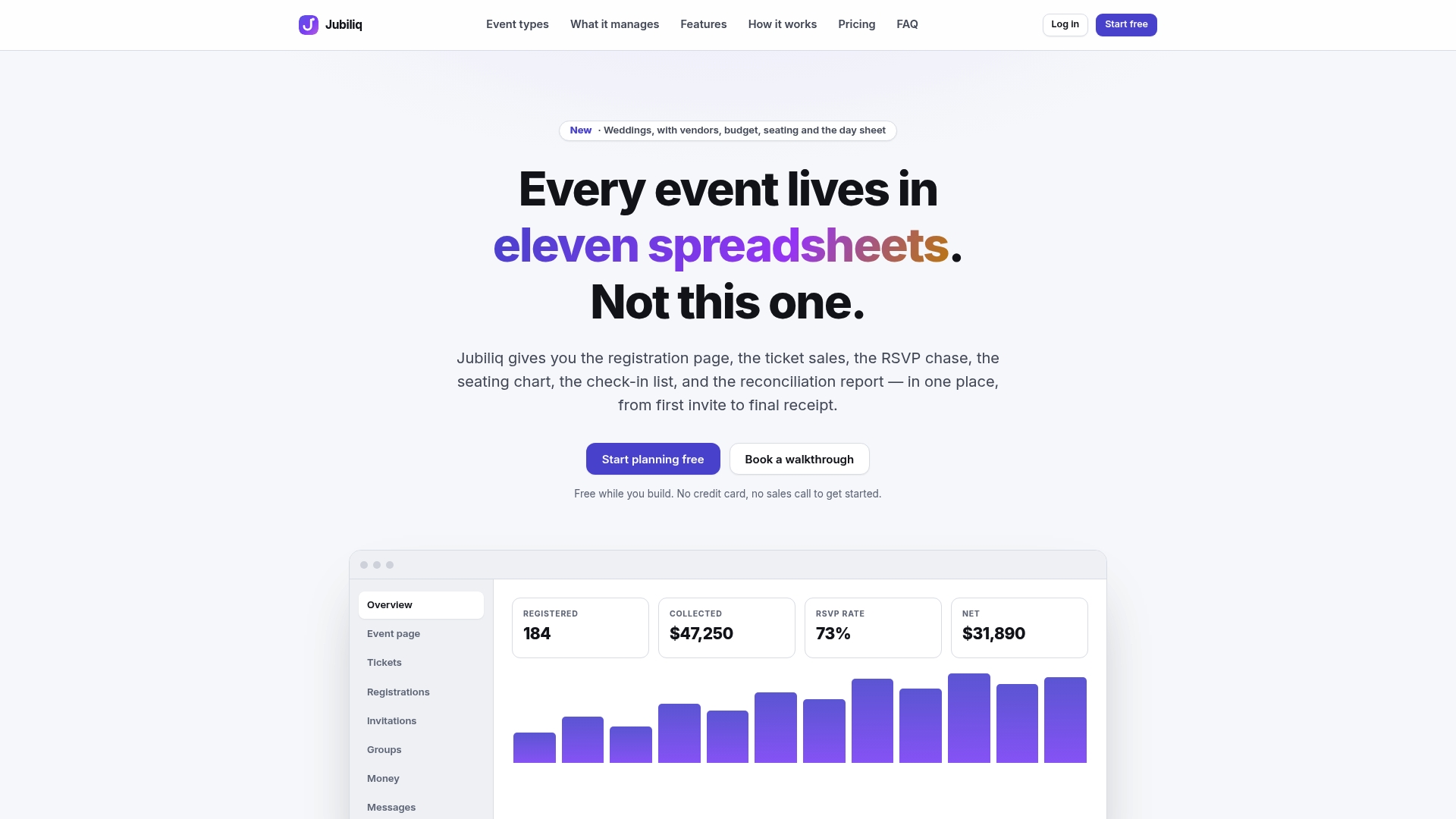
Look for a few specific things when you’re choosing a planning platform:
- Guest-list exports that update automatically as RSVPs come in, instead of requiring manual entry.
- An interface that adapts to a wedding specifically, hiding fields meant for corporate events or ticketed fundraisers.
- Real-time schedule updates that sync to a printable day sheet for your wedding party and vendors.
- Budget tracking that stays visible alongside your guest list, not buried in a separate app.
Jubiliq’s Starter plan is free for events without paid tickets, which covers most weddings. If you’re ready to see how it handles your guest list and RSVPs in one place, check the current plans at Jubiliq’s site.
Sources
- Do You Need a Wedding Website? Pros and Cons for Modern Couples - Confetti Magazine
- How to Write the Perfect Wedding Website (With Examples) | Plan A Wedding
- Wedding Website Essentials: What to Include (and What to Skip) - WhenWillYouMarry
- How to Create the Perfect Wedding Website for Your Big Day - Brides
FAQ
What Should a Wedding Website Include?
At minimum, include the date, venue addresses with map links, an RSVP form with a deadline, dress code, travel and accommodation notes, a registry link, and an FAQ. These cover the questions guests ask most, and a complete site built around these essentials cuts down significantly on repeat questions.
What Is the 50/20/30 Rule for Weddings?
It has nothing to do with website content directly, but a platform with built-in budget tracking, like Jubiliq, can help you monitor whether you’re following it.
What Are Some Fun Things to Include on My Wedding Website?
A photo gallery, a curated Things to Do page for out-of-town guests, and a shared playlist are popular additions that add personality without cluttering the core pages. Keep these secondary to the essentials; a fun extra should never push the RSVP form or venue address further down the page.
What Are Good URL Ideas for a Wedding Website?
Most couples use both first names, both last names, or a shared nickname combined with the wedding year, like “sarahandjake2026” or “thesmithwedding.com.” Keep it short enough to say out loud on a phone call and easy enough to type without guessing at spelling.
Does Jubiliq Work for Wedding Websites?
Jubiliq handles the planning side of a wedding, including RSVP tracking, guest-list management, budgeting, and printable day sheets, alongside its event website publishing option. It’s built for couples who want RSVPs and guest data in one place rather than split across a separate site builder and spreadsheet.