Scale Beyond 20 Guests: RSVP Tracking Organizers Can Rely On

Scale Beyond 20 Guests: RSVP Tracking Organizers Can Rely On
For most events, use a real-time platform that gives you live RSVP counts, custom fields, automated reminders, and on-day check-in. A spreadsheet or a quick share link works fine for a backyard cookout, but the moment vendors, seating charts, or payments enter the picture, you need something built for it. This event planning platform consolidates the entire workflow into one dashboard, from the first invite to the final headcount at the door.
TL;DR:
- Basic RSVP tools like spreadsheets or free sites suffice for small, informal events, but they lack export and real-time updating for larger or vendor-dependent events.
- Full event platforms provide structured data, automated reminders, QR check-in, and vendor-ready exports, making them essential for weddings, corporate functions, or fundraisers.
- Setting clear RSVP deadlines, testing forms on mobile devices, and planning for last-minute changes are crucial steps to ensure accurate headcounts and smooth execution.
- Connecting RSVP data with your event calendar prevents manual updates and ensures real-time accuracy for day-of check-in and logistics management.
- Jubiliq consolidates RSVP tracking with vendor management and scheduling, supporting scalable events from small gatherings to hundreds of attendees.
Table of Contents
- What Is RSVP Tracking?
- When Should You Use a Simple Tool vs. a Full Platform?
- Spreadsheet, Browser Tool, Free Site, or Platform: What Actually Works
- What Features Actually Matter for RSVP Response Tracking?
- How Do You Set Up RSVP Tracking From Invite to Door?
- How Jubiliq Brings RSVP Tracking Into One Workflow
- Getting Your Guest List Ready for Vendors
- Does RSVP Tracking Need to Connect to Your Calendar?
- What Should a Mobile RSVP App Actually Do?
- How Do You Handle Last-Minute Changes and Cancellations?
- How Do You Get More Guests to Actually RSVP?
- Editorial Take: Speed vs. Vendor-Ready Data
- Let Jubiliq Handle RSVPs From Invite to Check-In
- Sources
- FAQ
What Is RSVP Tracking?
RSVP tracking is the process of capturing, organizing, and updating guest response data in real time, not just whether someone is coming, but everything an organizer needs to run the event smoothly. Good RSVP tracking means the moment a guest replies, that information flows into a live count you can trust, filter, and hand off to a caterer or venue without re-typing anything.
A basic “yes/no” isn’t enough for most events. The fields that actually matter include:
- Confirmation status (attending, declined, or pending)
- Party size, including plus-ones and their names
- Dietary needs and food allergies
- Accessibility requirements (wheelchair access, sign language interpretation, dietary substitutions)
- Custom questions specific to the event (song requests, T-shirt sizes, carpooling)
Structured fields beat free-text answers because they turn into usable data instantly. If a guest types “I’m vegetarian and bringing my sister, she’s gluten-free” into an open comment box, someone has to read that, interpret it, and manually add it to a seating chart or a catering count. A structured form captures the same information in fields a caterer can total in seconds. This is the difference between guest list management that scales past 20 people and one that collapses under its own good intentions once the RSVPs start rolling in.
When Should You Use a Simple Tool vs. a Full Platform?
The right method depends less on how fancy the event sounds and more on what happens with the data afterward. Here’s how to think about it:
- Browser-based utility for tiny, informal gatherings. If you’re hosting eight friends for a game night, a lightweight tool that saves inputs locally in your browser is often faster than signing up for anything. You skip account creation entirely, and your guest list never touches a server. The trade-off is that these tools rarely export data or sync across devices, so they only make sense when the guest list is small and the stakes are low.
- Free RSVP sites for social events with light logistics. Platforms built around shareable event pages and quick text-based invites, the kind The Atlantic describes as reshaping how younger hosts throw parties, work well for birthdays, casual meetups, and reunions. They’re fast to set up and easy to share, but they’re not designed to hand off structured counts to a caterer.
- Full event platforms for anything with vendors, payments, or structured data needs. Weddings, corporate events, fundraisers, and galas need custom questions, CSV exports, and check-in tools that a free link-sharing app was never built to provide.
Weigh cost, privacy, and data ownership too. A free tool that stores your guest list on a third-party server isn’t the same privacy posture as a platform that gives you export control and account-level permissions.
Spreadsheet, Browser Tool, Free Site, or Platform: What Actually Works
Every RSVP tracking method has a real use case, and the honest answer is that none of them is wrong, just wrong for the wrong event.
- Spreadsheets give you total control and work offline, which matters if you’re paranoid about losing data. The catch is that someone has to manually update every row, chase non-responders by hand, and hope two people aren’t editing the same file at once. Sync errors and version confusion are the top complaint from organizers who’ve tried to run a 150-guest wedding this way.
- Browser-based utilities are the fastest option to stand up. No login, no waiting. But they typically offer a handful of fields and no server-side export, so once you need to hand a list to a venue coordinator, you’re back to copying data by hand.
- Free RSVP sites shine for informal social events. The Wall Street Journal has covered the shift toward text-message-first party planning tools that prioritize speed and shareability over structured data. That’s great until you need a dietary breakdown for a caterer, at which point the format works against you.
- Full platforms support custom forms, QR code check-in, segmented reminders, and vendor-ready exports. They cost more or take a bit more setup time upfront, but they’re the only category built to survive contact with real vendor logistics.
Pro Tip: Before you commit to a method, ask one question: will anyone besides me need this guest list? If the answer is yes, a spreadsheet or a browser tool is going to cost you more time in cleanup than it saved you in setup.
What Features Actually Matter for RSVP Response Tracking?
Most RSVP tools look similar on the surface. The features that separate a smooth event from a chaotic one show up on the day itself, not during setup.
- A real-time dashboard with status filters. You should be able to see confirmed, pending, and declined guests at a glance, without exporting anything first.
- Custom questions built into the form itself, not bolted on as an afterthought, so dietary and accessibility data arrives structured and vendor-ready.
- Automated reminders that can be segmented. Non-responders a week out need a different message than people who RSVP’d yes but haven’t picked a meal option.
- CSV export in formats vendors actually accept. A caterer doesn’t want a screenshot of your dashboard, they want a spreadsheet they can sort.
- On-day check-in through QR codes or unique guest links, so you can reconcile who actually showed up against who said they would.
- Guest self-edit capability, so a guest who needs to change their plus-one count doesn’t have to email you directly.
Coverage of platforms like Partiful and similar apps notes that features like real-time dashboards, custom fields, automated reminders, and QR check-in are consistently what separates casual tools from ones organizers trust for anything with real logistics attached. If you’re managing catering choices alongside RSVPs, a system built for digital menu and guest relationship management can help you connect meal selections directly to headcounts instead of tracking them separately.
How Do You Set Up RSVP Tracking From Invite to Door?
Setting up event RSVP management correctly the first time saves you from rebuilding your workflow two weeks before the event. Follow this sequence:
- Decide what your vendors actually need. Talk to your caterer and venue before you build your form. A headcount alone won’t cut it if they need meal breakdowns by category.
- Set your RSVP deadline with enough runway to follow up with stragglers and still hit vendor deadlines. Work backward from the vendor’s final-count date, not forward from your invite date.
- Choose your method and configure the required fields. Pick between a spreadsheet, a free site, or a full platform based on the decision map above, then build in the custom questions you identified in step one.
- Build the invite and test it on your own phone. Submit a test RSVP yourself before sending anything out. A form that breaks on mobile loses responses silently, and you won’t know until it’s too late.
- Set reminders and segment your non-responders. Don’t send the same message to everyone; the people who already confirmed don’t need a “please RSVP” nudge.
- Plan your on-day check-in and do a dry run. If you’re using QR codes, test the scan process with a real phone camera under real lighting, not just a screen mockup.
- Export your final list and get it to vendors with real lead time, giving caterers and venues enough runway to plan around your actual numbers instead of a stale estimate.
Pro Tip: Run your test RSVP with a fake plus-one and a dietary restriction filled in. If that data doesn’t show up cleanly in your dashboard or export, fix it now, not the week of the event.
How Jubiliq Brings RSVP Tracking Into One Workflow
Jubiliq was built around a simple observation: RSVP data doesn’t live in isolation. It affects seating, catering counts, budget forecasts, and the day-of schedule all at once, so treating it as a separate spreadsheet task creates duplicate work.
- This platform consolidates RSVP tracking with vendor management, guest list management, budget tracking, and task scheduling in a single dashboard, so a confirmed headcount updates your catering budget and seating plan automatically.
- The planning interface changes based on event type, so a wedding organizer sees seating and catering tools while a corporate event planner sees sponsorship and ticketing options, with irrelevant features hidden rather than cluttering the screen.
- Real-time updates, financial tracking, and a printable day sheet mean the person running check-in at the door is working from the same numbers as the person who built the budget earlier.
For organizers juggling multiple vendors and a shifting guest count, that consolidation removes the manual reconciliation step that eats up the final week before any event.
Getting Your Guest List Ready for Vendors
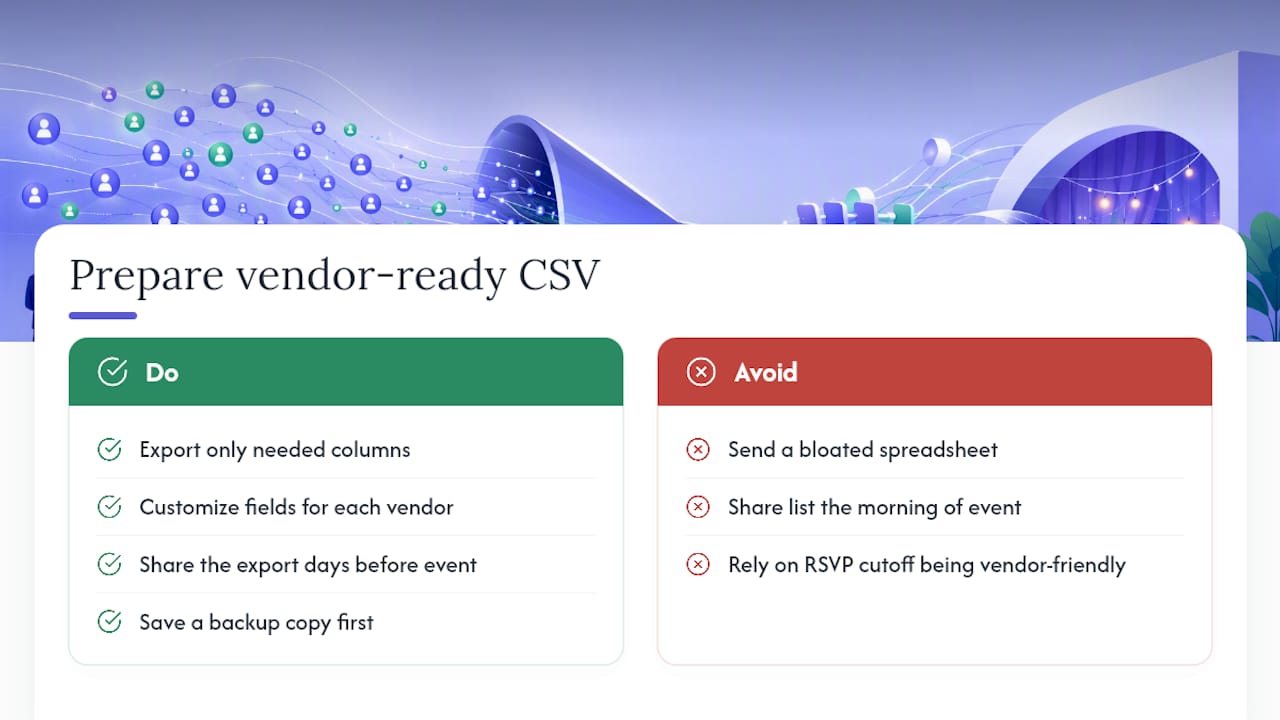
A CSV export is the universal language between your RSVP tool and everyone else involved in your event. Caterers, venues, and rental companies don’t want a login to your platform. They want a file they can open, sort, and count.
The trick is exporting the right columns. A caterer needs meal counts and dietary flags, not your guests’ phone numbers. A venue coordinator needs total headcount and any accessibility notes, not your seating preferences. If your tool lets you customize which fields appear in an export, use that. Sending vendors a bloated spreadsheet with 20 irrelevant columns just means they have to do the filtering you could have done for them.
Timing matters as much as formatting. Export and share your list with vendors a few days before the event rather than the morning of, giving them enough room to adjust their own staffing or supply orders around your final numbers. If your RSVP deadline falls too close to your vendor’s cutoff, you’re setting yourself up to guess.
One more habit worth building: export a backup copy for yourself before you send anything out. If a vendor’s email bounces or a file gets corrupted in transit, you don’t want your only clean copy sitting in someone else’s inbox.
Does RSVP Tracking Need to Connect to Your Calendar?
If your RSVP tool lives completely separate from your calendar and event management software, you end up doing manual data entry twice. Every confirmed guest, every schedule change, every vendor meeting has to get typed into two places instead of one.
Integration matters most for events with moving parts across weeks or months, weddings with multiple vendor meetings, corporate events with agenda items tied to headcount, fundraisers where sponsor commitments and guest RSVPs both feed into the same budget. When your RSVP data and your event calendar are connected, a change in one place doesn’t require a manual update in the other.
This is also where day-of scheduling gets real. A printable day sheet that pulls live from your RSVP dashboard tells your day-of coordinator the actual headcount instead of the estimate from three weeks ago. That single detail prevents the classic problem of a caterer over-preparing for 150 guests when only 130 showed up, or under-preparing when a last wave of confirmations comes in the final week.
If you’re managing task scheduling and RSVP tracking in different systems entirely, look for at least basic calendar export or sync so the two data sets don’t drift apart.
What Should a Mobile RSVP App Actually Do?
Most guests will RSVP from their phone, not a desktop browser, so mobile functionality isn’t a bonus feature, it’s the primary interface. A mobile-friendly RSVP form needs to load fast, autofill contact details when possible, and never require pinch-zooming to answer a question.
For organizers, the mobile side matters even more on event day. QR code check-in only works if the scanning interface is fast and forgiving of bad lighting or an angled phone camera. A good mobile app for RSVP tracking also lets you glance at your live dashboard from your phone while you’re setting up chairs, not just from a laptop at home.
Push notifications are the other piece worth checking. If a guest updates their RSVP the morning of the event, does that change reach you immediately, or does it sit in an inbox you won’t check until after doors open? The gap between those two experiences is often the difference between a smooth check-in line and a confused one.
How Do You Handle Last-Minute Changes and Cancellations?
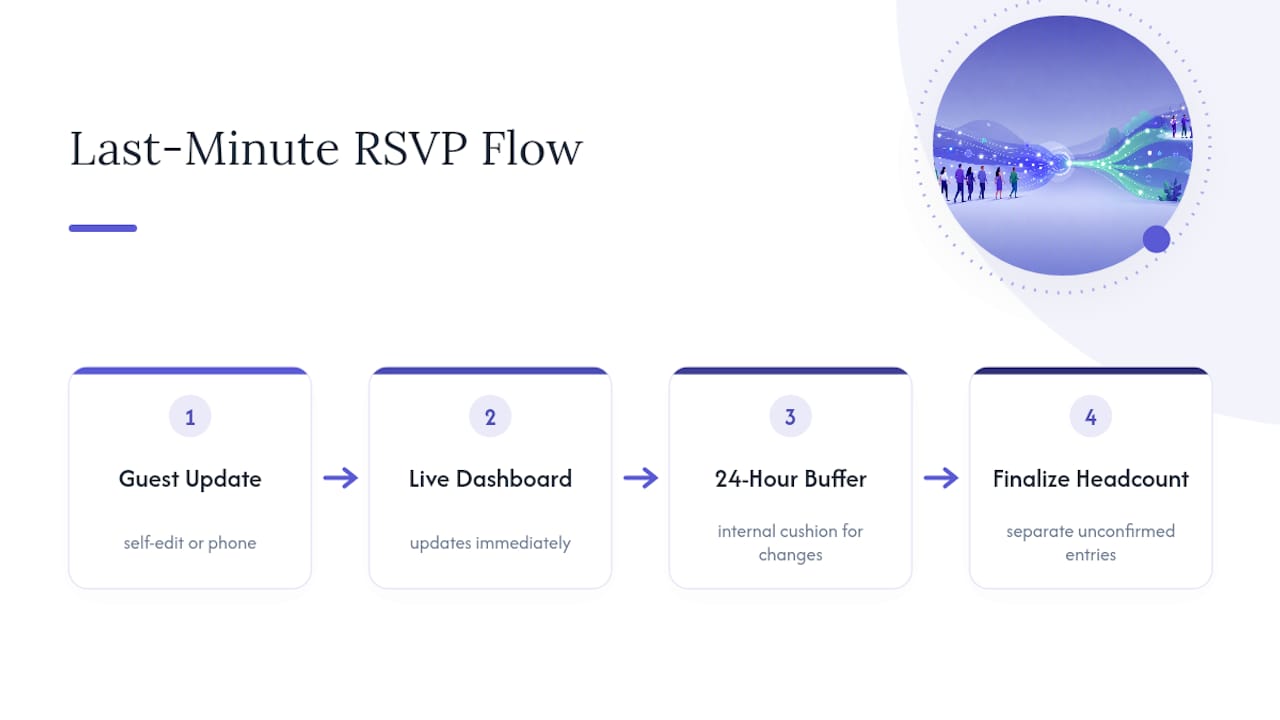
Guests cancel. Plus-ones change. Someone’s kid gets sick two hours before your event starts. Handling this well isn’t about preventing it, it’s about building a workflow that absorbs it without chaos.
Give guests a self-edit option whenever possible, so a cancellation updates your dashboard directly instead of arriving as a text message you have to manually log. This alone eliminates most of the lag between what guests know and what your headcount shows.
Set an internal buffer between your public RSVP deadline and the moment you actually lock numbers with vendors. Even a 24-hour cushion gives you room to catch late changes before they become a caterer’s problem. And keep a manual override path for the inevitable last-minute add or drop that comes through a phone call instead of your form. If your tool lets you flag entries as “unconfirmed, pending update,” use it, rather than letting a stale “yes” sit in your final export.
How Do You Get More Guests to Actually RSVP?
Response rates drop when guests don’t know why their answer matters or when the form asks for too much too soon. A few adjustments consistently move the needle:
- Set a clear, specific deadline instead of “let us know soon.” Ambiguity is the single biggest driver of non-response.
- Keep the initial form short. Ask for confirmation and party size first; save detailed dietary or song-request questions for a follow-up once someone has already said yes.
- Send at least two reminders, timed differently for non-responders versus people who confirmed but left fields incomplete.
- Make the RSVP link work on mobile without friction. A form that requires zooming or creating an account loses responses silently.
- Tell guests what happens with a late RSVP. People respond faster when they understand a caterer needs a real number by a specific date, not an arbitrary internal preference.
Editorial Take: Speed vs. Vendor-Ready Data
Choose speed for a backyard birthday party; choose structure for anything with a caterer, a seating chart, or a budget attached. Most organizers guess wrong in one direction: they build a beautiful, complicated form for a casual get-together, or they trust a free share-link tool with a 200-guest wedding. Test your actual workflow, form to export to check-in, weeks before the event, not the night before.
— HCRF
Let Jubiliq Handle RSVPs From Invite to Check-In
This platform is built for organizers who want RSVP tracking, vendor coordination, and day-of execution in one place instead of stitched together from three different tools. For events such as weddings with catering counts, corporate events with sponsor logistics, or fundraisers juggling ticket sales and donations, the adaptive interface surfaces tools relevant to the event type and hides the rest.
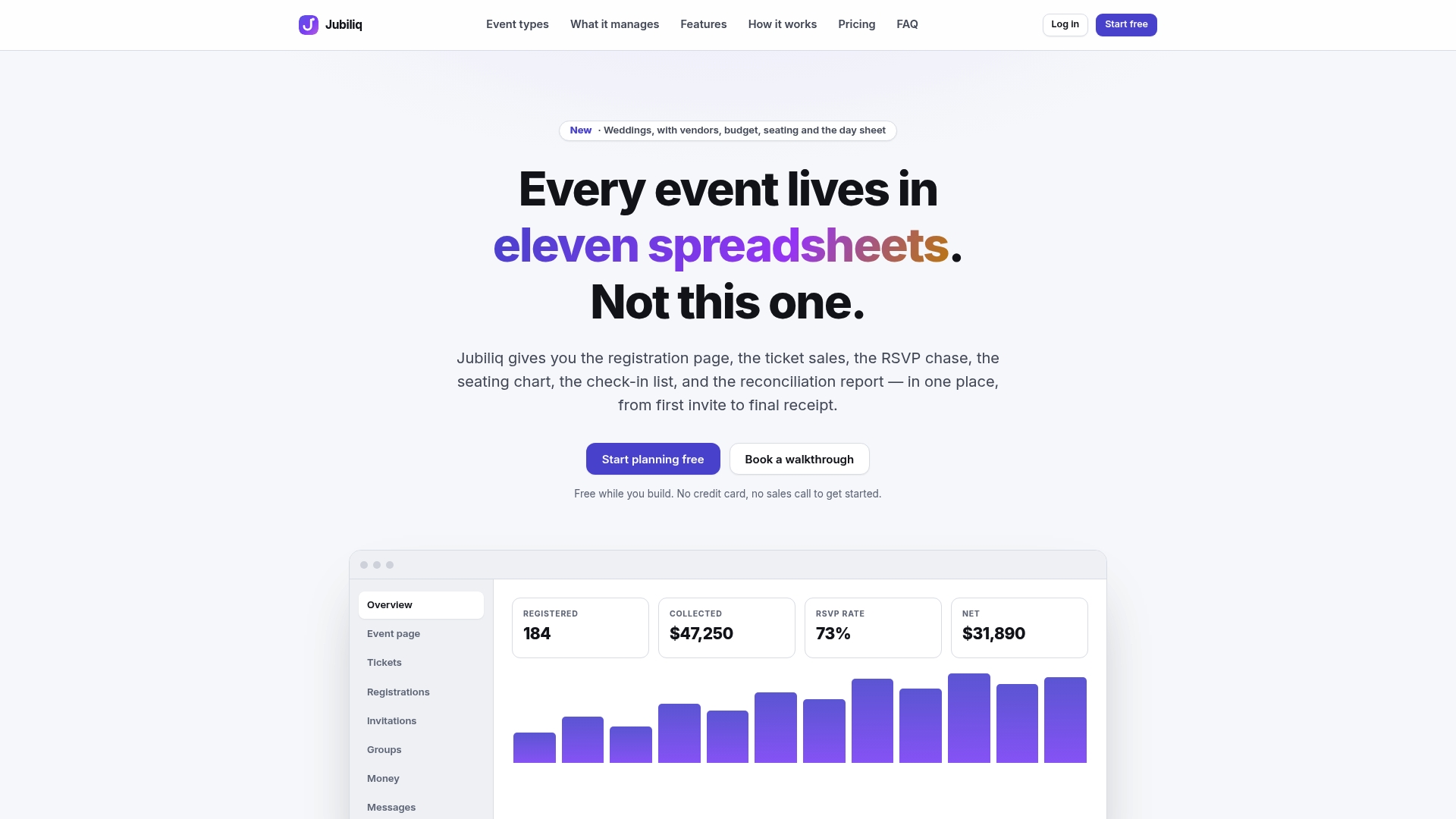
Organizers running paid ticketed events pay a percentage per registration on certain plans, while others like weddings, parties, and planning-only use can remain free. Larger organizations running multiple events can inquire about custom pricing options. Dashboard tools can scale to support events ranging from a few dozen to several hundred attendees.
Start planning your event on Jubiliq and see your first RSVP dashboard update in real time.
Sources
FAQ
What Is RSVP Tracking?
RSVP tracking is the practice of capturing and updating guest responses in real time, including confirmation status, party size, and details like dietary needs. Most modern tools centralize this in a live dashboard rather than a static list, which is where guest list management and vendor coordination actually connect.
What Is the Best Way to Track RSVPs?
For events with vendors, seating, or a budget attached, a full platform with a real-time dashboard, custom fields, and CSV export is the most reliable method. Platforms like Jubiliq combine that RSVP data with the rest of event planning, so a confirmed guest updates your catering count and budget at the same time. For tiny, informal gatherings, a quick browser-based tool or a free RSVP site works fine.
What Does RSVP Stand For?
RSVP comes from the French phrase “répondez s’il vous plaît,” meaning “please respond.” It’s used on invitations to request a confirmation from guests, and modern RSVP tracking tools are simply digital systems for collecting and organizing those responses.
Is There a Free RSVP Tracker Available?
Yes, several free RSVP sites and browser-based utilities exist for casual social events, and Jubiliq’s Starter plan is free for weddings, parties, and planning-only use with no paid ticketing involved. Free tools work well until you need structured vendor exports or paid ticket sales, at which point a platform built for that handoff becomes worth the setup time.