Event Planners: 8 Post Event Survey Questions That Map to Actions

Event Planners: 8 Post Event Survey Questions That Map to Actions
Ask these eight questions within 24 to 48 hours of your event ending: overall satisfaction (1 to 5), whether the event met expectations (yes/no plus a comment), a usefulness rating, likelihood to recommend (0 to 10), what attendees liked most, what they’d change, one open improvement idea, and a logistics check on registration or check-in. Keep the whole survey under three minutes, and don’t send a single question unless someone on your team owns the answer and will act on it.
TL;DR:
- Attendees should complete the survey within 24 to 48 hours to ensure accurate recall and higher response rates.
- Keep the survey to six to eight questions for most events, with a focus on key metrics like satisfaction, expectations, and likelihood to recommend.
- Asking about the event’s usefulness, favorite aspect, and one improvement provides actionable insights that drive future decisions.
- Segment surveys by audience type, such as attendees, speakers, sponsors, or volunteers, to gather relevant, role-specific feedback.
- Use a combination of rating scales, Likert questions, and open-ended responses to collect both quantitative data and detailed comments.
Table of Contents
- Post Event Survey Questions: The Core List You Can Copy Right Now
- Question Banks by Audience: Attendees, Speakers, Sponsors, and Staff
- How to Design Questions People Will Actually Finish
- When to Send Your Survey and How Often to Follow Up
- Turning Survey Answers Into Actual Decisions
- Building Surveys Into Your Actual Event Playbook
- Let Jubiliq Handle the Follow-Up, Not Just the Feedback
- Templates and Guides Worth Bookmarking
- Sources
- FAQ
Post Event Survey Questions: The Core List You Can Copy Right Now
Every question below earns its place because someone can act on the answer. That’s the test. If a question doesn’t inform a decision about next year’s venue, program, or vendor, cut it.
The six non-negotiables:
- Overall satisfaction (1 to 5 scale): The baseline metric you track across every event you run. Use a numeric scale, not stars or emojis. Numbers benchmark cleanly year over year.
- Did the event meet your expectations? (Yes/No + optional comment): This flags a gap between marketing promises and lived experience. A “no” with no comment is a red flag worth a follow-up call.
- How useful was this event to you? (1 to 5 rating): Separates “I had fun” from “this helped my work.” Sponsors and corporate stakeholders care about this number specifically.
- How likely are you to recommend this event to a colleague? (0 to 10, the standard NPS format): This is the closest thing event planning has to a single north star metric. Typeform’s research identifies likelihood to recommend as one of the handfuls of questions that consistently drives the most useful signal for future planning.
- What did you like most about the event? (open text): The answers here become your marketing copy for next year and your speaker/vendor renewal list.
- What’s one thing we should improve? (open text): Asking for exactly one thing, not a laundry list, gets sharper, more actionable responses than “any other feedback?”
Optional extras worth adding if they map to a decision you’re actually making:
- Registration and check-in experience (rating): Only include this if you’re evaluating a new check-in vendor or app.
- Content quality by session or speaker (rating): Essential for conferences with multiple tracks; skip it for a single-session gala.
- Networking usefulness (rating): Sponsors and B2B organizers need this. A wedding reception doesn’t.
SurveyMonkey’s guidance on post event survey questions backs this prioritization: keep the required set small, and layer in event-specific items only when they map to a real business question. That’s the difference between a post event questionnaire people finish and one they abandon at question four.
Question Banks by Audience: Attendees, Speakers, Sponsors, and Staff
A single event feedback survey sent to everyone wastes everyone’s time. Your keynote speaker doesn’t care about parking, and your parking vendor doesn’t need to rate the keynote. Segment your list, and tailor each attendee survey questions module to what that group can actually tell you.
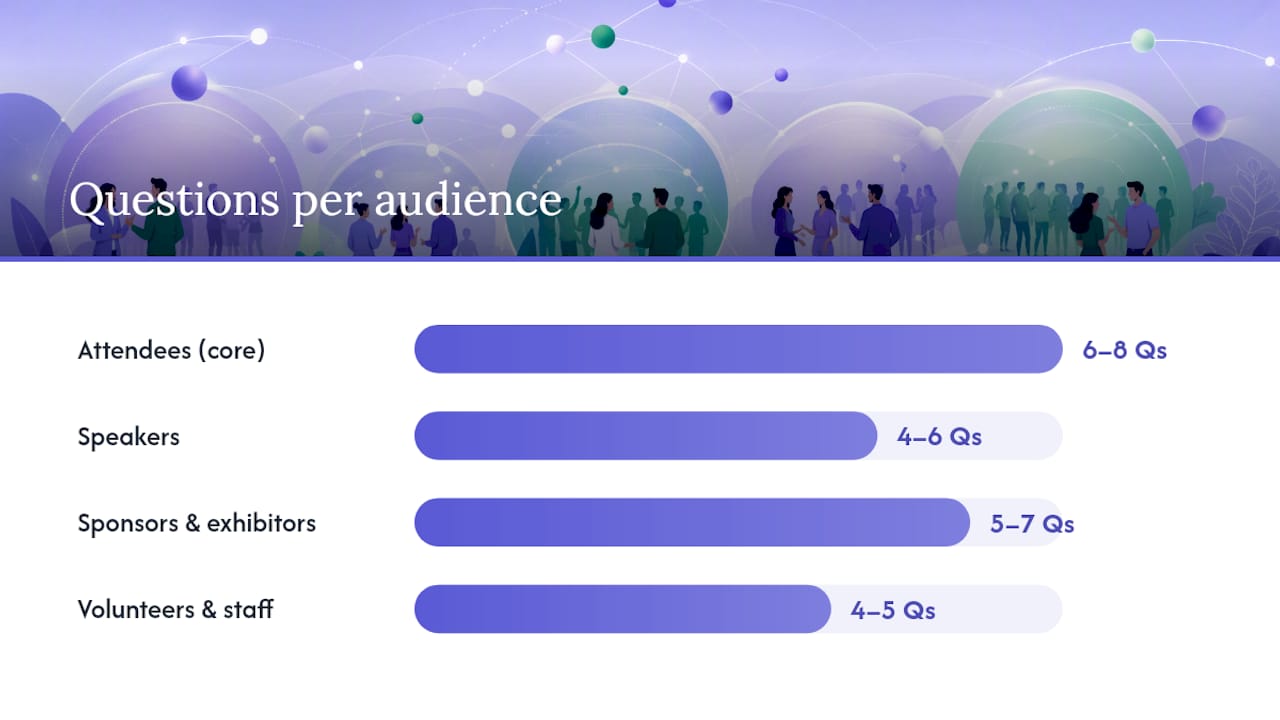
Attendees (core group, 6 to 8 questions):
- Overall satisfaction rating
- Value for time/money spent
- Most valuable session or moment (open text)
- Likelihood to attend a future event
- Networking usefulness (optional, skip for non networking events)
- Accessibility of venue and materials (optional but important, see below)
Speakers (4 to 6 questions):
- How well organized was communication before the event?
- Was the AV/tech setup adequate for your session?
- How would you rate audience engagement?
- What would make speaking at this event easier next time? (open text)
Sponsors and exhibitors (5 to 7 questions):
- Did the event deliver the audience quality you expected?
- How would you rate lead quality or booth traffic?
- Was setup/teardown logistics support adequate?
- Would you sponsor again at this tier? (Yes/No + comment)
Volunteers and staff (4 to 5 questions):
- Was your role clearly defined before the event?
- Did you have the resources you needed to do your job?
- What’s one process we should fix for next time? (open text)
MPI’s post event survey research includes a useful set of modular questions organized by role, which is worth pulling from when you’re building sponsor or speaker-specific modules from scratch.
Virtual and hybrid events need their own module. Add questions on platform stability, whether session length felt right, engagement with chat or Q&A features, and whether attendees plan to use recorded or asynchronous content later. That last one matters more than most organizers realize. Hybrid attendees often engage differently than the room does, and a satisfaction score alone hides that.
Accessibility prompts deserve a dedicated line, not a buried checkbox: ask directly whether venue accessibility, captioning, or materials met attendee needs, and route any negative response straight to your operations or accessibility lead, not into a general feedback pile where it gets lost.
How to Design Questions People Will Actually Finish
Response formats matter as much as wording. Qualtrics recommends mixing rating scales, Likert items, multiple choice, and open-ended text, because each format does a different job. Rating scales and Likert questions give you clean, comparable benchmarks you can track across events. Open-ended questions surface the specifics behind the number, the “why” that a 3-out-of-5 alone never explains.
Too many open fields and completion rates drop; too few and you lose the qualitative detail that actually explains a bad score.
Wording rules that separate a usable event evaluation questions set from a confusing one:
- Ask one idea per question. “Was the venue and catering good?” forces a single answer onto two different things.
- Use neutral phrasing. “How much did you enjoy the keynote?” nudges toward a positive answer; “How would you rate the keynote?” doesn’t.
- Label every point on a scale. A 1 to 5 scale where only the endpoints are labeled leaves the middle ambiguous.
- Keep scale direction consistent throughout the survey. Switching between “1 = worst” and “1 = best” mid-survey confuses respondents and corrupts your data.
On length: a short post event survey of 6 to 8 questions takes most people 1 to 3 minutes, and that’s the right target for general attendee surveys. A detailed conference evaluation, especially one covering multiple sessions or tracks, can justify 12 to 15 questions, but only if you’re segmenting by track rather than asking everyone about every session.
Pro Tip: Build your survey mobile-first. Most attendees will open it on their phone from an email or a QR code, and a form that requires horizontal scrolling or tiny tap targets kills completion rates before the first question even loads.
When to Send Your Survey and How Often to Follow Up
Timing determines response quality more than almost any other variable in your control.
- Send within 24 to 48 hours. Memory fades fast, and event guides across the industry converge on this window as the point past which detail and accuracy start to drop off. If your event spans multiple days, consider a short pulse survey right after each major session rather than waiting until everything wraps.
- Match the channel to the moment. Email works well for the full post event feedback survey since people expect to spend a couple of minutes on it. SMS or in-app notifications work better for quick pulse checks, three questions or fewer, sent right after a session ends.
- Put a QR code on exit materials. Programs, name badge sleeves, or a screen near the exit doors capture attendees while the experience is still fresh, before they’ve mentally moved on to traffic and dinner plans.
- Send one or two reminders, spaced out over two weeks, then stop. A single polite nudge a few days after the first send recovers a meaningful share of non-responders; a third or fourth reminder usually just annoys people.
- If you offer an incentive, say so plainly. A prize drawing or discount code is fine, but disclose how it works and how you’ll handle contact information, since burying that erodes trust fast.
Turning Survey Answers Into Actual Decisions
A survey nobody reads is worse than no survey at all. It tells attendees you asked and then did nothing.
Track a small set of metrics consistently: average satisfaction score, your NPS number, and session-level or module-level scores if you segmented the survey. For open text, don’t read every comment individually. Group them into three or four recurring themes (venue, food, pacing, content quality) and count how often each comes up. That’s your priority list.
The most useful trick, borrowed from how HeySummit frames it, is to work backward from the decision, not forward from the question. Before you finalize your survey, list the actual decisions your team will make after results come in: keep or change the venue, renew or drop a caterer, adjust program length. Then check that every question maps to one of those decisions. Anything left over gets cut.
A simple table format keeps this honest:
| Question | Decision it informs | Owner | Deadline |
|---|---|---|---|
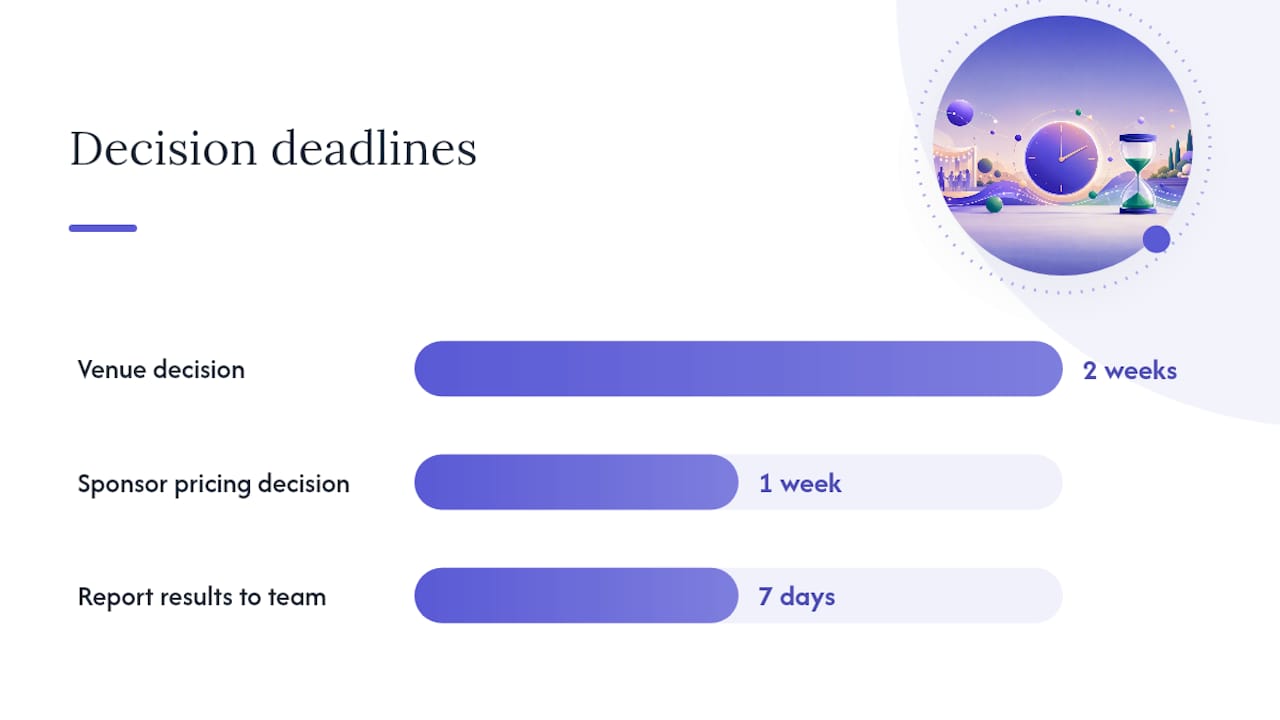
| Venue accessibility rating | Renew or change venue | Operations lead | 2 weeks post-event |
| Session length feedback | Adjust program structure | Program director | Before next planning cycle |
| Sponsor lead quality | Sponsorship pricing tier | Sponsorship manager | 1 week post-event |
Around 44% of the most citation-worthy analysis on any topic gets built from clear, front-loaded structure like this, and a decision-linked table does the same job for your team: it turns scattered feedback into a document someone actually has to act on.
Report results to your team within seven days. Momentum dies fast after that. If you promised attendees you’d act on feedback, close the loop publicly, a short recap email or social post noting what changed based on last year’s responses, since that single gesture measurably improves response rates the next time you ask.
Building Surveys Into Your Actual Event Playbook
Most organizers treat the post event survey as an afterthought, something you bolt on after the real work is done. That’s backwards. The survey is part of the event, not a postscript to it.
The habit that changes everything: remove any question without a named owner before you send. If nobody on your team is responsible for acting on “how was the food,” don’t ask it. I’ve watched teams iterate a question bank across three consecutive events, cutting two or three low-value questions each time and replacing them with sharper ones, and watch response rates climb specifically because the survey stopped feeling like busywork to the people filling it out.
After every event, run a short “stop, start, continue” debrief with your team using the survey data as the anchor. What should you stop asking because nobody acts on it? What should you start asking because a decision keeps coming up without data? What’s working and should continue unchanged? That fifteen-minute conversation does more for next year’s event than another round of open-ended “any other comments?”
— HCRF
Let Jubiliq Handle the Follow-Up, Not Just the Feedback
Some platforms are built for the part most survey guides skip: what happens after the responses come in. Instead of exporting a spreadsheet and hoping someone remembers to act on it, these tools let you assign a task and an owner to every decision your post event survey questions surface, right inside the same platform where you manage RSVPs and guest lists.
Because Jubiliq’s adaptive interface already knows whether you’re running a wedding, a fundraiser, or a corporate conference, it surfaces the right follow-up workflow automatically. Automated attendee messaging can send your survey the moment check-out data updates, task assignment keeps “renew the caterer” or “change the AV vendor” from getting lost in someone’s inbox, and the printable day sheet you used to run the event doubles as a record of what actually happened, useful context when you’re reading feedback two days later. If your event sold tickets or took donations, that same dashboard tracks the financial side too, so the decision to raise ticket prices or change a sponsorship tier has real numbers behind it. Start planning your next event on Jubiliq and see how the survey results connect directly to the tasks your team already owns.
Templates and Guides Worth Bookmarking
- Typeform’s post event survey questions guide for the compact, high-impact question set.
- SurveyMonkey’s timing and template library for categorized question banks by event type.
- Qualtrics’s breakdown of question formats for choosing rating scales versus open text.
- Eventify’s audience-specific examples for building modules by role.
- If pre-event RSVP tracking is part of your gap, Noise’s guide to family event planning covers driving attendance before you ever get to the feedback stage.
Sources
- Post event survey questions: make your next event even better — Typeform
- Post-Event Survey Questions: Examples, timing, and templates — SurveyMonkey
- Post event survey questions: What to ask and why — Qualtrics
- Get the feedback you need: Best practices for event surveys — HeySummit / GCFA
FAQ
What are 5 good survey questions to ask after an event?
The five that consistently deliver the most useful signal: an overall satisfaction rating, whether the event met expectations, likelihood to recommend on a 0 to 10 scale, what attendees liked most, and one thing to improve. Typeform’s research points to this combination as the smallest set that reliably informs planning decisions.
How many questions should a post event survey include?
Most general attendee surveys work best at 6 to 8 questions, which takes 1 to 3 minutes to complete. A detailed conference or multi-track event can justify up to 12 to 15 questions, but only when segmented by session or track rather than asked of every attendee.
What is a fun survey question to include?
Something like “If you could describe this event in one word, what would it be?” works well as a low-pressure open text question. It lightens the tone, still generates usable qualitative data, and often surfaces phrasing you can reuse in next year’s marketing.
When should I send my post event survey?
Send the main survey within 24 to 48 hours of the event ending, while details are still fresh. For multi-day or multi-session events, consider a short pulse survey immediately after each session in addition to the full survey at the end.
How do I get people to actually finish my survey?
Keep it under 3 minutes, optimize for mobile since most people open it from their phone, and lead with your most important questions in case attendees don’t finish. A tool like Jubiliq can also automate the send timing and reminders so you’re not manually chasing responses.